Posts

FTP Connection In Installed Alfresco | Code Factory

Image
Note  :  First check that PC is able to create FTP connection... Step 1 : Stop alfresco. Step 2 : Add these properties in < alfresco> -> tomcat -> shared -> classes -> alfresco-global.properties ftp.enabled=true ftp.port=2121 Step 3 : Start alfresco. Step 4 : Check FTP connection is successfully created or not using URL. ftp:// :2121/alfresco Tags : Alfresco Tutorial Configuring the FTP file server How To Enable FTP On Alfresco? Transfer and Get File Using FTP

FTP Connection In Alfresco | Code Factory

Image
Note : First check that PC is able to create FTP connection... Step 1 : Add these properties in alfresco-global.properties ftp.enabled=true ftp.port=2121 Step 2 : Start Repo and Share. Step 3 : Check FTP connection is successfully created or not using URL. ftp:// :2121/alfresco Tags : Alfresco Tutorial Configuring the FTP file server How To Enable FTP On Alfresco? Transfer and Get File Using FTP

Java DOM Parser - Parse XML Document | Code Factory

Image
File : ReadXMLFile.java package com.codeFactory; import java.io.File; import javax.xml.parsers.DocumentBuilder; import javax.xml.parsers.DocumentBuilderFactory; import org.w3c.dom.Document; import org.w3c.dom.Element; import org.w3c.dom.Node; import org.w3c.dom.NodeList; public class ReadXMLFile { public static void main(String[] args) { // TODO Auto-generated method stub try { File folder = new File("./src/com/codeFactory"); File[] listOfFiles = folder.listFiles(); // get all files details for (int i = 0; i File : staff.xml yong mook kim mkyong 100000 low yin fong fong fong 200000 low yin fong fong fong 200000 low yin fong fong fong 200000 File : staff1.xml yong mook kim mkyong 100000 low yin fong fong fong 200000 low yin fong fong fong 200000 low yin fong fong fong 200000 Tags : Java DOM Parse...

Add and Delete User Using REST API In Alfresco | Code Factory

Image
Alfresco One 5.x Developer's Guide :  Download. Log in : GET  /alfresco/s/api/login?u={username}&pw={password?} Log in and establish a ticket.  Input u cleartext user name (must be URL encoded) pw cleartext password (must be URL encoded) Returns the new authentication ticket.  The user name and password are provided as URL arguments which may be logged by proxies or the Alfresco server. Add Person : POST  /alfresco/s/api/people Adds a new person based on the details provided.  userName mandatory - the user name for the new user firstName mandatory - the given Name lastName mandatory - the family name email mandatory - the email address password optional - the new user's password. If not specified then a value of "password" is used which should be changed as soon as possible. disableAccount optional - If present and set to "true" the user is created but their account will be disabled. quota optional - Sets the ...

Upload Metadata And Files Using Batch Import Or Bulk Import In Alfresco | Code Factory

Image
Alfresco One 5.x Developer's Guide :  Download. Streaming bulk import is exposed in two web scripts: A simple UI web script that can be used to set up the parameters for an import. This is an HTTP GET web script with a path of: http://localhost:8080/alfresco/service/bulkfsimport An initiate web script that kicks off an import using parameters that are passed to it (for the source directory, target space, and so on). If you want to script or invoke the tool programmatically, this is the web script that you call. This is an HTTP POST web script with a path of:  http://localhost:8080/alfresco/service/bulkfsimport/initiate The UI web script presents the following simplified HTML form: The  Import directory  field is required and indicates the absolute file system directory to load the content and spaces from, in an OS-specific format. Note that this directory must be locally accessible to the server on which the Alfresco instance is running. It m...

SMTP Server Configuration In DSpace | Code Factory

Image
Download DSpace  :   Download. - Stop tomcat - Open dspace.conf (D: -> dspace -> config)   -  Edit properties or uncomment it mail.server = smtp.gmail.com mail.server.username = username@gmail.com mail.server.password = PASSWORD mail.server.port = 465 mail.allowed.referrers = localhost mail.extraproperties = mail.smtp.socketFactory.port=465, \ mail.smtp.socketFactory.class=javax.net.ssl.SSLSocketFactory, \ mail.smtp.socketFactory.fallback=false -  Start tomcat ( NOTE : If you change <dspace-x.x-src-release> -> dspace -> config -> dspace.conf then you must Build and Configure the dspace and then start tomcat ) Tags : DSpace tutorial DSpace SMTP server setup for enabling Emails Dspace Gmail SMTP Configuration Configure Gmail on Dspace How to configure smtp email settings in DSpace Configure SMTP mail server On Dspace

WYSIWYG Editor In DSpace | Code Factory

Image
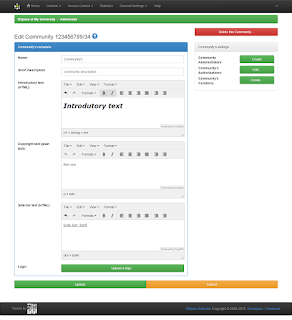
Download DSpace :  Download. In order to allow HTML in item metadata, we propose the inclusion of a WYSIWYG editor during Describe Step. This addition would allow a user to enter rich text as metadata value. Here are some case scenarios: Allow abstracts with some visual styles like bold, italic Allow free HTML Also, it would allow the use of additional plugins like Latex formulas. To add WYSIWYG editor in DSpace, an easy and good option is adding online .js to any page because DSpace doesn't have any plugin. Add online .js in header-submission.jsp (<tomcat> -> webapps -> jspui -> layout), it adds WYSIWYG editor in all pages. If you want to add WYSIWYG editor to only for particular page then add .js to page where you want this editor like add .js to edit-community.jsp  (<tomcat> -> webapps -> jspui -> tools)  Add this code to your JSP page. Useful links :  https://www.tinymce.com/ http://summ...